Best XMAX V3 Pro and V4 Pro Temperature Settings
The XMAX V3 Pro and V4 Pro both run from 100 to 220 °C in 1 °C steps, and the maker's advice is simply to start with a lower temperature and increase it gradually to taste. As a starting point, reviewers suggest roughly 175 to 190 °C for the cleanest flavor and 200 to 220 °C for denser vapor in fewer draws. The Starry 4 has a wider range, 100 to 240 °C.
This guide covers temperature settings. For loading and first use, see how to use the XMAX V3 Pro and V4 Pro, and for chamber size see XMAX capacity. The wider principles are in finding the right temperature for flavor and efficiency. More XMAX articles are in the XMAX hub.
- The temperature range
- How to change the temperature
- Where to start
- Dialing in step by step
- Session vs on-demand mode
- Airflow on the V4 Pro
- Button shortcuts
- Keeping hot settings comfortable

1. The Temperature Range
| Model | Range | Heat-up (maker) |
|---|---|---|
| XMAX V3 Pro | 100 to 220 °C (212 to 428 °F) | About 10 seconds, no more than 20 |
| XMAX V4 Pro | 100 to 220 °C (212 to 428 °F) | About 10 seconds, no more than 20 |
| XMAX Starry 4 | 100 to 240 °C (212 to 464 °F) | About 20 seconds; about 30 for 240 °C |
The V3 Pro and V4 Pro figures come from the manufacturer's manuals and support pages, and the Starry 4 figures from its FAQ. Retailer specifications describe the steps as single degrees. For the differences between the models, see our naming guide.
2. How to Change the Temperature
- Click the up (+) or down (−) button to change the temperature by one degree. Hold the button to change it faster.
- To switch between Celsius and Fahrenheit, press the power button and the down button together. The manual says to hold them for about two seconds.
- The OLED display shows the set temperature, the current temperature as it heats, the mode and the battery level.
- The device remembers its last temperature setting when you switch it on.
3. Where to Start
The manufacturer does not publish a "best" number: its support pages say that the higher the temperature, the denser the vapor, and advise starting low and increasing gradually. Reviewers give more specific starting points:
- Around 175 to 190 °C: a retailer's V4 Pro review recommends this range for the cleanest taste, and says flavor is at its best in the first two or three draws.
- Around 185 to 190 °C: the same review suggests this with the airflow left open for the best flavor. A V3 Pro reviewer likewise suggested starting at about 370 °F (around 188 °C) and stepping up between draws.
- Around 210 to 220 °C: reviewers say higher settings give denser vapor in fewer draws, but the vapor gets warmer, particularly above about 200 °C.
Based on that, 185 °C is a sensible first setting, and one retailer notes the V4 Pro starts at 180 °C out of the box. Move up or down by 5 °C at a time until you find what suits your herb and your grind. A loose, medium-ground load matters as much as the number; see how much fits in the chamber.
4. Dialing In, Step by Step
- Load the chamber loosely with a medium grind, below the top of the oven.
- Set 185 °C and wait for the vibration or the display to show that the device is ready.
- Take a few short draws. If the vapor is thin or the flavor faint, add 5 °C.
- If it is warm or harsh, drop 5 °C or shorten the draw.
- One reviewer notes that flavor is strongest early in a load and turns more roasted later, so raising the temperature part-way through is one way to finish a load.
- Note the numbers you like for each herb and reuse them.
5. Session vs On-Demand Mode
The XMAX starts in session mode, where the timer counts down once the device reaches temperature; the manuals list 4 or 6 minute timers. To switch to on-demand, press the up and down buttons together once; the device then heats only while you hold the power button. In on-demand mode it enters standby after 30 seconds without any operation, then counts down 120 seconds and shuts down. Mode changes how the device heats, not what the temperature numbers mean, so the same starting points apply. Battery life differs between modes; see our battery guide.
6. Airflow on the V4 Pro and Starry 4
The V4 Pro has a three-position airflow slider on the body, which the V3 Pro lacks. The Starry 4 has an airflow adjustment button. The Starry 4's support page says more airflow gives denser vapor. A reviewer suggests keeping the V4 Pro's airflow open at around 185 to 190 °C for the best flavor, and says tighter settings and higher temperatures give warmer, stronger vapor. Treat that as a starting point rather than a rule.
7. Button Shortcuts at a Glance
The V3 Pro and V4 Pro manuals use the same button combinations for most functions, so it helps to keep them in one place:
| To do this | Do this (per the manuals) |
|---|---|
| Switch on or off | Click the power button three times. The V4 Pro vibrates to confirm shutdown. |
| Raise or lower the temperature | Press or hold the up or down button. |
| Change the session timer (4 or 6 minutes) | Hold the power button and the up button together for 2 seconds. |
| Switch between session and on-demand | Click the up and down buttons together once. |
| Switch between °C and °F | Hold the power button and the down button together. |
| Flip the screen (V4 Pro) | Press the up, down and power buttons together once. |
| Adjust airflow (V4 Pro) | Push the air adjustment button up or down. |
In on-demand mode, the V3 Pro manual says the device vibrates three times and suspends heating after 30 seconds. Keep pressing the power button to carry on for another 30 seconds. In session mode, the device vibrates when it is ready and the timer starts counting down, and you inhale through the mouthpiece.
If you use a dosing capsule in the V4 Pro, the manual says not to overload the cup, and the recommended fill is approximately half of the cup's area. That is a good reason to start with a small load while you learn how each temperature feels.
8. Keeping Hot Settings Comfortable
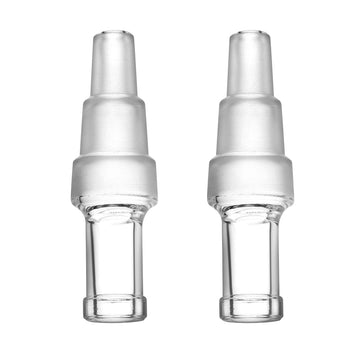
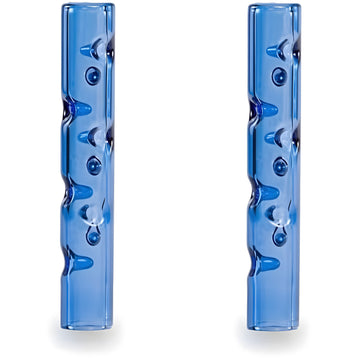
Vapor warms up toward the top of the range. Shorter draws help, and so does extra cooling. Our 130 mm glass cooling beads stem adds dry cooling, and the 10, 14 and 18 mm WPA water tool lets the glass mouthpiece connect to a water pipe. Both are listed for the V3 Pro and V4 Pro. Browse the full XMAX V3 Pro and V4 Pro accessories collection.
Final Thoughts
With 1 °C steps, the XMAX gives you plenty of control. Start around 185 °C, change one step at a time, and move up toward 210 to 220 °C only when you want denser, warmer vapor. Keep the load loose, and add cooling if the higher settings feel too warm.